/a2a - Agent Gateway (A2A Protocol)
| Feature | Supported |
|---|---|
| Logging | ✅ |
| Load Balancing | ✅ |
| Streaming | ✅ |
tip
LiteLLM follows the A2A (Agent-to-Agent) Protocol for invoking agents.
Adding your Agent
You can add A2A-compatible agents through the LiteLLM Admin UI.
- Navigate to the Agents tab
- Click Add Agent
- Enter the agent name (e.g.,
ij-local) and the URL of your A2A agent
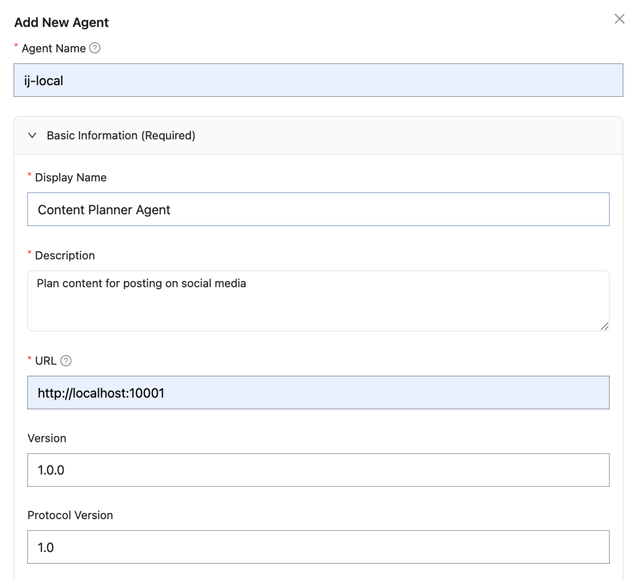
The URL should be the invocation URL for your A2A agent (e.g., http://localhost:10001).
Invoking your Agents
Use the A2A Python SDK to invoke agents through LiteLLM:
base_url: Your LiteLLM proxy URL +/a2a/{agent_name}headers: Include your LiteLLM Virtual Key for authentication
invoke_a2a_agent.py
from uuid import uuid4
import httpx
import asyncio
from a2a.client import A2ACardResolver, A2AClient
from a2a.types import MessageSendParams, SendMessageRequest

# === CONFIGURE THESE ===
LITELLM_BASE_URL = "http://localhost:4000"  # Your LiteLLM proxy URL
LITELLM_VIRTUAL_KEY = "sk-1234"             # Your LiteLLM Virtual Key
LITELLM_AGENT_NAME = "ij-local"             # Agent name registered in LiteLLM
# =======================

async def main():
    base_url = f"{LITELLM_BASE_URL}/a2a/{LITELLM_AGENT_NAME}"
    headers = {"Authorization": f"Bearer {LITELLM_VIRTUAL_KEY}"}

    async with httpx.AsyncClient(headers=headers) as httpx_client:
        # Resolve agent card and create client
        resolver = A2ACardResolver(httpx_client=httpx_client, base_url=base_url)
        agent_card = await resolver.get_agent_card()
        client = A2AClient(httpx_client=httpx_client, agent_card=agent_card)

        # Send a message
        request = SendMessageRequest(
            id=str(uuid4()),
            params=MessageSendParams(
                message={
                    "role": "user",
                    "parts": [{"kind": "text", "text": "Hello, what can you do?"}],
                    "messageId": uuid4().hex,
                }
            ),
        )
        response = await client.send_message(request)
        print(response.model_dump(mode="json", exclude_none=True))

if __name__ == "__main__":
    asyncio.run(main())
Streaming Responses
For streaming responses, use send_message_streaming:
invoke_a2a_agent_streaming.py
from uuid import uuid4
import httpx
import asyncio
from a2a.client import A2ACardResolver, A2AClient
from a2a.types import MessageSendParams, SendStreamingMessageRequest

# === CONFIGURE THESE ===
LITELLM_BASE_URL = "http://localhost:4000"  # Your LiteLLM proxy URL
LITELLM_VIRTUAL_KEY = "sk-1234"             # Your LiteLLM Virtual Key
LITELLM_AGENT_NAME = "ij-local"             # Agent name registered in LiteLLM
# =======================

async def main():
    base_url = f"{LITELLM_BASE_URL}/a2a/{LITELLM_AGENT_NAME}"
    headers = {"Authorization": f"Bearer {LITELLM_VIRTUAL_KEY}"}

    async with httpx.AsyncClient(headers=headers) as httpx_client:
        # Resolve agent card and create client
        resolver = A2ACardResolver(httpx_client=httpx_client, base_url=base_url)
        agent_card = await resolver.get_agent_card()
        client = A2AClient(httpx_client=httpx_client, agent_card=agent_card)

        # Send a streaming message
        request = SendStreamingMessageRequest(
            id=str(uuid4()),
            params=MessageSendParams(
                message={
                    "role": "user",
                    "parts": [{"kind": "text", "text": "Hello, what can you do?"}],
                    "messageId": uuid4().hex,
                }
            ),
        )

        # Stream the response
        async for chunk in client.send_message_streaming(request):
            print(chunk.model_dump(mode="json", exclude_none=True))

if __name__ == "__main__":
    asyncio.run(main())
Tracking Agent Logs
After invoking an agent, you can view the request logs in the LiteLLM Logs tab.
The logs show:
- Request/Response content sent to and received from the agent
- User, Key, Team information for tracking who made the request
- Latency and cost metrics

API Reference
Endpoint
POST /a2a/{agent_name}/message/send
Authentication
Include your LiteLLM Virtual Key in the Authorization header:
Authorization: Bearer sk-your-litellm-key
Request Format
LiteLLM follows the A2A JSON-RPC 2.0 specification:
Request Body
{
  "jsonrpc": "2.0",
  "id": "unique-request-id",
  "method": "message/send",
  "params": {
    "message": {
      "role": "user",
      "parts": [{"kind": "text", "text": "Your message here"}],
      "messageId": "unique-message-id"
    }
  }
}
Response Format
Response
{
  "jsonrpc": "2.0",
  "id": "unique-request-id",
  "result": {
    "kind": "task",
    "id": "task-id",
    "contextId": "context-id",
    "status": {"state": "completed", "timestamp": "2025-01-01T00:00:00Z"},
    "artifacts": [
      {
        "artifactId": "artifact-id",
        "name": "response",
        "parts": [{"kind": "text", "text": "Agent response here"}]
      }
    ]
  }
}